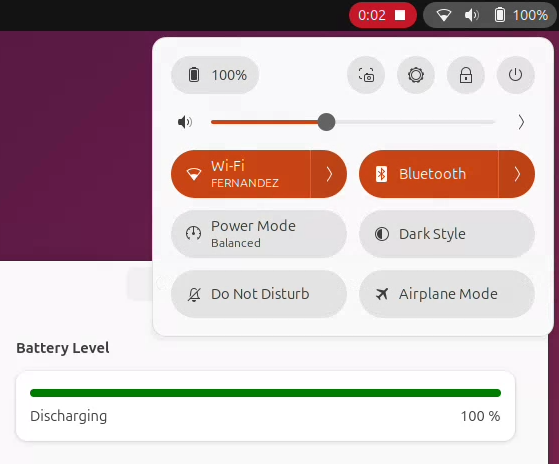
Battery Percent on Argon ONE UP (Ubuntu)
I received the unit yesterday and started testing it. Argon provides a script to manage the battery, but it does not integrate natively with the operating system. The problem is that the script does not register any battery on the power_supply subsystem, so the system cannot recognize the battery as standard.
According to the block diagram, the Argon ONE UP uses a Cellwise CW2217 chip connected over I2C (on RPI1, bus i2c-1, address 0x64), so creating a driver for it is not very difficult.
I created the driver and uploaded it to GitHub cw2217-battery. After installing it, the system can display the battery percentage on Ubuntu or Debian.
 Build & Install the Module
Install the dependencies.
sudo apt update
sudo apt install git build-essential linux-headers-$(uname -r)
Build the driver module
git clone https://github.com/diegojfer/cw2217-battery.git
cd cw2217-battery

make
After building, you should have the build/cw2217_battery.ko kernel module. You can then install the module manually.
# Install module
sudo mkdir -p /lib/modules/$(uname -r)/extra
sudo cp build/cw2217_battery.ko /lib/modules/$(uname -r)/extra/

# Recreate dependency graph
sudo depmod -a

# Load module
sudo modprobe cw2217_battery

# Load automatically on boot
echo cw2217_battery | sudo tee /etc/modules-load.d/cw2217_battery.conf
 DeviceTree Overlay
By default, the bootloader does not expose the CW2217 IC to the kernel (it only enables the I2C bus). Therefore, you need to either add a Device Tree entry or create the device manually.
Register Manually
If you choose to register it manually, you will have to recreate the device every time the system reboots.
# Create device
echo cw2217 0x64 | sudo tee /sys/bus/i2c/devices/i2c-1/new_device

# If you want to remove device
echo 0x64 | sudo tee /sys/bus/i2c/devices/i2c-1/delete_device
Register on Bootloader
To register an overlay, you need to know where the bootloader loads overlay files from. Normally, on Ubuntu on Raspberry Pi, this is /boot/firmware/current/overlays.
// FILE: cw2217-overlay.dts

/dts-v1/;
/plugin/;

/ {
    compatible = "brcm,bcm2711", "brcm,bcm2712", "brcm,bcm2835";

    fragment@0 {
        target = <&i2c1>;
        __overlay__ {
            #address-cells = <1>;
            #size-cells = <0>;
            status = "okay";

            cw2217: battery@64 {
                reg = <0x64>;
                compatible = "cellwise,cw2217";
            };
        };
    };
};
# Compile DeviceTree Overlay
dtc -@ -I dts -O dtb -o cw2217.dtbo cw2217-overlay.dts

# Copy DeviceTree Overlay
sudo mv cw2217.dtbo /boot/firmware/current/overlays/cw2217.dtbo
After compiling and copying the Device Tree overlay, you must enable it. To do this, add the following line under the [all] section in config.txt.
dtoverlay=cw2217
 Known Issues
-
Kernel updates: After updating the kernel, you must rebuild and
reinstall the module because it is an external driver. Consider
using DKMS to automate this. -
No DeviceTree overlay: If you create the I2C device manually
(new_device), you will need to recreate it after every reboot.
Using a proper overlay avoids this.
 Example