A buddy of mine just got his Argon 1UP and said that Ubuntu 25 apparently didn’t support the keyboard or trackpad, even after an update. I was hoping to NOT go with Raspberry Pi OS myself - has anyone successfully gotten Ubuntu or any other distros working on the 1UP?
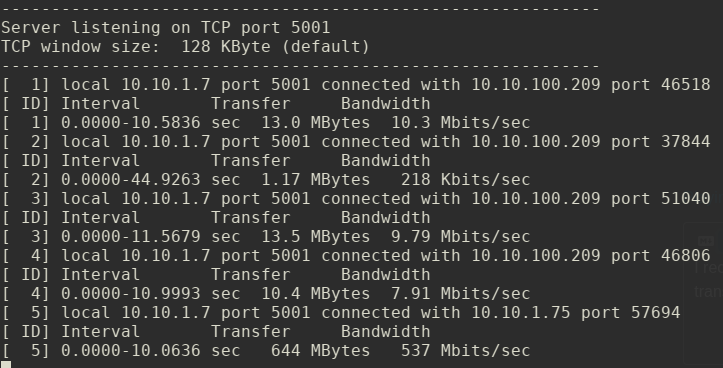
I received my 1UP this morning. Are there any known issues with the WiFi? I’m getting abysmal transfer speeds over WiFi.
Tests 1 - 4 are on the 1UP (tried both 2.4GHz and 5GHz). Test 5 is on my Dell laptop same location, same AP.
@Malwolficus - Yeah no problem - running Alpine Linux here so doesn’t even have to be Debian based. (It is a lot easier if you are running the RPi kernel, DT & config.txt model though)
Check the instructions in the Quick Start guide, update 11 in Kickstarter or the wiki under Software Configuration, First Boot, Other OS.
I am having similar symptoms here. Speed seems to be less than ideal when I am able to connect successfully. On the day of unboxing I was able to connect, but a day later I can’t seem to establish a stable connection. It’s odd. I wish I’d have another antenna with this small connector to test.
UPDATE: after applying some thermal pad over the wifi module and the connector as well network the stability has improved!
1 Like
I am playing around myself as well and I realized that sometimes certain key presses are registered double, which means I am typing and there are ddoubled letters here and there where no repeating letters are expected. See the world ddoubled that was such a duplication which I left there unfixed.
Yup I have had that. In Alpine/Wayland/labwc I have added a repeatDelay of 1200 to the keyboard section of rc.xml. The default is 600 - 1200 seems to mostly work for me. I guess it is a sensitive keyboard and those of us with fat fingers need to admit we cannot touch type 
ps - unable to edit this to show my actual entry as this stupid discord forum keeps interpreting the html for itself…
I changed my using the Control Center only but to the max, because I don’t know where the rc.xml is located, and I gave up researching for it too fast.
Can you add a picture of how the thermal pad was added to the wifi module. Just want to make sure my positioning was correct
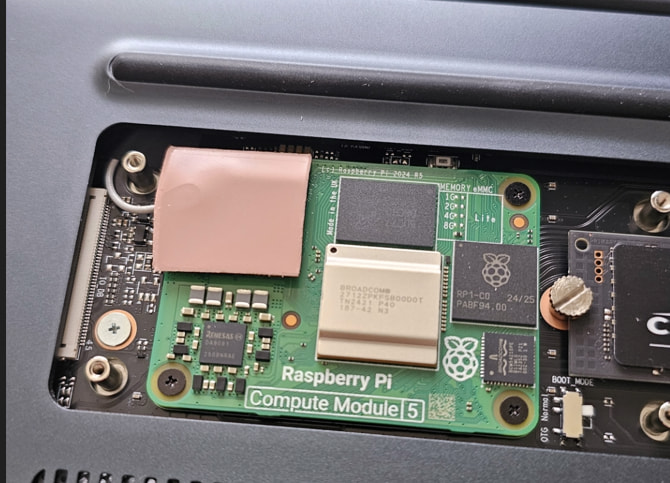
Thanks for the reply. For some reason, when i added the thermal pad in this manner, my wifi signal strength tanked. I was initially getting around 160-180 Mbps, but after applying the thermal pads, it lowered to 8 Mbps on my home wifi network. I have the argon oneup laptop model with everything already installed, including the small plastic piece that is supposed to be used to prevent grounding, so perhaps the thermal pad was a bit counterproductive? If anyone has any insights, I would greatly appreciate it.
I’ve received my unit quite early in the release procedure (thank you, argon40!). So I’ve missed the now available wiki entry regarding setting “dtparam=ant2“ in
/boot/firmware/config.txt when setting up the argon one up. This is for switching the wifi antenna input to the CM5 U.FL connector, which you should use with the argon one up shell.
Please check, if you have such entry in your config.txt. If not, wifi signal strength will be sub-optimal inside a such beautiful metal case 
HTH
NightHawk
Wrong Argon product… this is thread is about the LAPTOP One UP…
Might want to post on a ONE thread…