Did you have dtparam=ant2 in your config.txt. this would allow your cm5 to use the external antenna instead of the internal one.
2 Likes
Thanks very much. That was it. The signal strength isn’t amazing, but it’s much better than it was.
1 Like
Is the keyboard supposed to be backlit?
To turn on and off the backlit on the keyboard press fn+spacebar
6 Likes
Perfect!. It works to me.
Hi, I wasn’t able to join the Kickstarter, and I notice people have concerns about the trackpad. If there is going to be another production run, is there any chance of providing a haptic touchpad? For people who have used Macbooks, it is hard to go back to non-haptic. BTW I do prefer to tap rather than click.
Hi there,
I can’t get the Installation Script buttons to stick. I run the installation script
curl ``https://download.argon40.com/argononeup.sh`` | bash
and I can use the brightness buttons, the volume buttons, and the battery button; but as soon as I reboot, the buttons no longer work until I run the script again. However the battery indicator is still there on the desktop.
I have the Argon ONE UP Core. I re-installed the latest version of Raspberry Pi OS when I received it. The OS is full up to date.
Thanks, Jamie
1 Like
I am not sure if this is the solution, but you have two grave accents ( ` ) after the curl and before the vertical bar ( | ). I think if you remove these, you will get the script:
curl https://download.argon40.com/argononeup.sh | bash.
If this does not work, try typing https://download.argon40.com/argononeup.sh into a web url. You should be able to download the shell file. Then you can make it executable and run it in the command line.
Thanks for the reply, but I think that was just an artefact of my cutting and pasting the command line into the forums here.
The script runs fine on my Argon ONE UP and the buttons all work fine after the script has completed, but as soon as I reboot/shutdown my AOU the functionality on the buttons stops working. The only way to re-enable them is to re-run the script again … until the reboot/shutdown 
Can you try to add sudo to you command, if this would make the difference?
possible permissions for usr .. (MuddyDogs) post
might be help if usr post output of “groups”.. just a guess with little info given
Hi there
in General i am happy with my Argon OneUp. But there are a few issues.
I installed Ubuntu 25 for a much more modern UI than RaspberryOS IMO.
-
I get a message on each boot that the power supply is not able to provide 5A to the CM5 (with or without power supply connected, so battery powered or PD) so i assume there is an issue with the internal power supply?
-
Very poor WIFI speeds, my network is fast but on this laptop i only get around 1.2MB/s and only a 2.4GHz connection. I did add dtparam=ant2 in the config before the first boot. Also since someone stated the antenna isolation sticker on the THRML is not properly aligned with the antenna, i stuck a capton tape over the antenna connector this changed nothing to the signal strength nor WIFI speed.
-
Documentation states we should add thermal pad to the M.2 SSD. I got the preinstalled core and it has thermal pads only on the processor. Is this correct or an error?
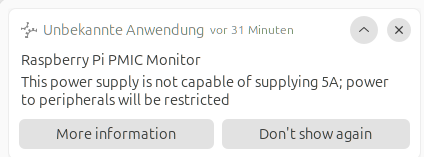
No reply to any of my issues?
I am not sure if I can answer all of your questions effectively, but here are my responses:
-
I think there maybe an issue with Ubuntu auto-negotiating the current draw from the internal battery. What you could do is add PSU_MAX_CURRENT=5000 to the eeprom file using sudo rpi-eeprom-config --edit (be very careful doing this though, make sure to save a copy of the original).
-
I am also having some issues with the wifi, but what based on some posts in the forum, adding a thermal pad to the wifi chip seems to work. I did add one, but the wifi performance increase is somewhat negligible for me. I will have to look into the wifi connectivity issue a bit more.
-
When I got my system, i only got a thermal pad on the processor as well. I ended adding some more thermal pads on the rp1 chip and the power management ICs on the CM5. I would recommend you reference the argon one up resource page ( Argon ONE UP Resource Page | Argon 40 Wiki ) for additional information.
Make absolutely sure that your config.txt file has:
dtparam=ant2
So the wifi chip will use the external antenna…
Jeff
1 Like
Hi @lijoseph ,
would it be possible for you guys to publish a full gpio map saying where you have connected what inside your One Up shell?
Like RP1/GPIO_27 being the low-active lid switch and stuff like that.
Would make things much easier when we’re creating our own dtb-overlays.
Thank you!
PS: Really love that device!
1 Like
Thanks for the suggestion - I tried this but it didn’t make any difference
But I have noticed that when I run the script the following line gets highlighted in red
Failed to connect to user scope bus via local transport: $BUS_SESSION_BUS_ADDRESS and $XDG_RUNTIME_DIR not defined (consider using –machine=@.host –user to connect to bus of other user)
Someone asked about groups
jamie adm dilout cdrom sudo audio video plugdev games users netdev lpadmin gpio i2c spi render input
Will you be issuing a firmware/driver update for the touchpad to fix its many annoyances?
Annoying problems I’ve noticed so far:
- tap to left-click: Sometimes doesn’t register as a left-click until I move the mouse cursor at least one pixel in any direction after lifting the tapped finger off the pad, at which point the system finally registers the click.
- tap two fingers to right-click: Often doesn’t register as a right-click, apparently due to my two fingertips tapping the pad at the exact same time. I have to slightly stagger the timing (so one finger taps just slightly before the other one) to get it to work.
- accidental tap-to-clicks while typing: This happens frequently, even when my skin hasn’t actually touched the pad at all but has simply strayed near it. The “ignore touchpad while typing” setting in the desktop environment (I’m using GNOME) doesn’t seem to make any difference.
Otherwise, this is a great little all-purpose Linux laptop so far!
Happens to me also with the clicks (I use clicks instead of taps): I click, nothing happens, I move the cursor and the click gets acknowledged.
Hi @lijoseph  do Argon Forty team plan to add support for RHEL-deritative distros like Fedora, AlmaLinux and Rocky Linux?
I created a dedicated topic with some of my observations: Request | Add RHEL support
Thanks 